Preface
I have now taken another step into the wild world of social media with a new Instagram profile. I created this account to help promote a few of my previous blog posts. I have zero experience with the platform, so here is hoping that everything goes well. Thankfully, there is a second part of this equation that I do have experience with: Canva. Canva is the site which I have previously used for other classes and used again for this one to create the graphics for the Instagram posts.
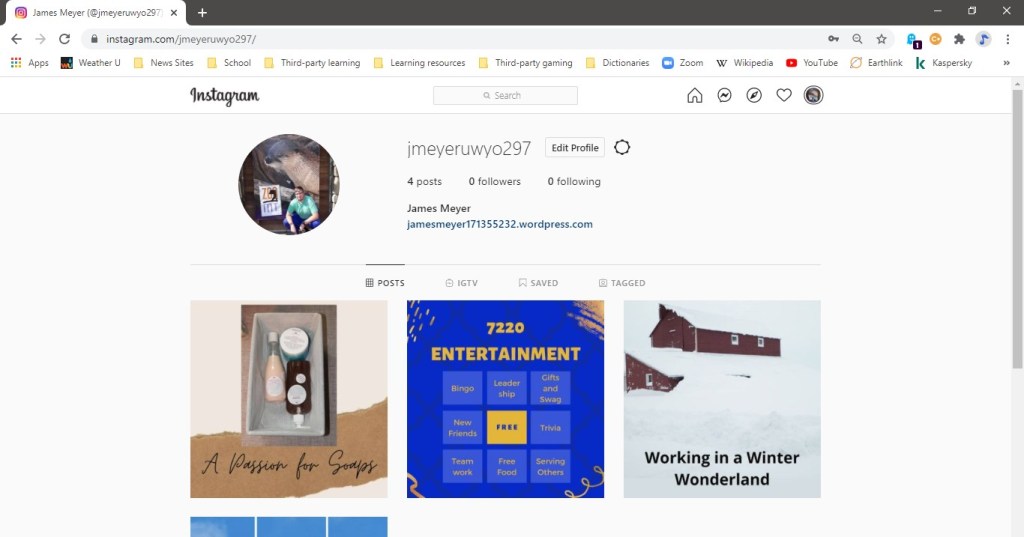
I didn’t use an overly complicated promotion strategy when creating these posts. I used available Canva templates and modified them as needed. I did experiment with fonts and colors, but they were hit and miss, so I left them alone. If specific characteristics become associated with me for the near future, I want those characteristics to be uncomplicated, straightforward, and honest. One part of me balks at the occasionally zealous promotion of content, and the other part of me understands that it is part of the world we now live in.
Thoughts
Not to come across as complaining, but what surprised me about this endeavor was how difficult it was. I will admit that I am not very literate with the big social media platforms. I can navigate around LinkedIn with little difficulty, but that’s about it. Trying to navigate Instagram on my phone and plan my posts was hard. Maybe it was because of my lack of familiarity that caused my troubles.
This may sound a bit unusual, but I don’t know how much or how little I’ll use Instagram, either professionally or personally. It’s not that I inherently dislike social media, but as I said, I’m not very social media literate. Additionally, I prefer platforms that I can browse and use with a mouse and keyboard instead of just a touchscreen. Canva, on the other hand, I can definitely see myself using personally. It’s a good starter site and provides a good amount of usable features with the free version.
 James Meyer